Mac · Windows · Linux · iPhone · Android

Your clipboard.
Right inside your keyboard.

Copy on your desktop. Open any app on your phone. Paste — instantly, straight from the keyboard. No switching, no emailing yourself, no nonsense. One clipboard across every device you own.

Real-time — it's there before you switch apps Founder pricing for early members
~ $ npm i -g syncer
Copied on Mac
#dev-team
npm i -g syncer
Message…
npm i -g syncer
https://…
Copy here, paste there across ·macOS ·Windows ·Linux ·iPhone ·Android

Your clipboard should follow you — not your operating system.

Copy on a Mac, paste on Android. Copy on Windows, paste on your iPhone. Syncer doesn't care which ecosystems your devices come from.

Stop emailing yourself links, notes, and codes.

You know the little rituals. Be honest.

"I'll just email it to myself."
"I'll send it to me on Discord."
"I'll open WhatsApp Web real quick."
"I'll save it in Notes."
"I'll AirDrop it." …it's an Android.
"I'll just remember it."

We all know how that ends.

Before Syncer

Copy the link
Email it to yourself
Unlock phone, open Gmail
Wait for it to arrive
Copy it again, switch app, paste

With Syncer

Copy the link
Paste on your phone
Done.
Syncer deletes the whole ritual. Copy. Paste. Done.
The part that makes people sit up

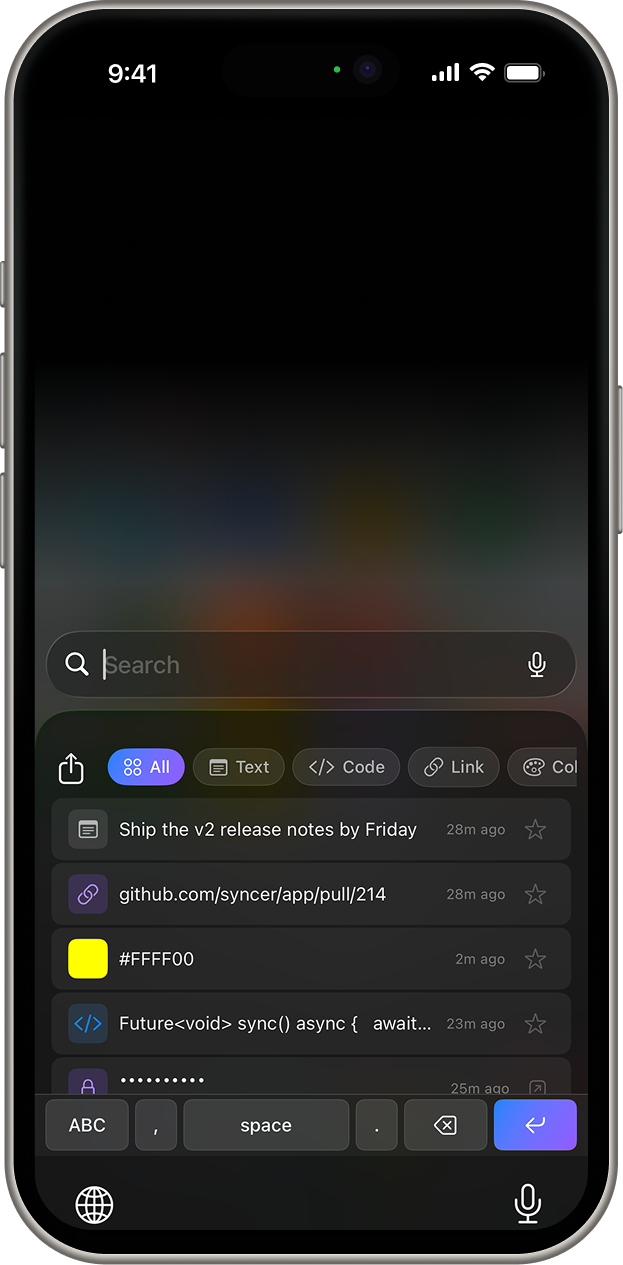
Your clipboard, on your phone's keyboard.

Most clipboard tools stop at the desktop. Syncer's keyboard lives inside every app on your phone — so whatever you copied on your laptop is one tap away, wherever you're typing. No app-switching. No "let me send this to myself." Just paste and move on.

1
Copy anything on your desktopA link, a command, a wall of text.
2
Open any app on your phoneMessages, Notion, a browser, a form.
3
Tap it on the Syncer keyboardPasted at your cursor. That's the whole thing.
Get early access
Syncer keyboard on iOS showing synced clipboard items inside a chat app
Syncer clipboard and keyboard on Android
Copied on your Mac
github.com/you/repo
tap it on your phone's keyboard
Pasted into Slack. Done.
Copied on your Mac
ssh root@server
switch to your Linux box
Pasted in the terminal. Done.
Copied on your desktop
OTP  583 214
tap on your phone
Pasted — then auto-expired.
Works inside WhatsApp Works inside VS Code Works inside Slack Works inside Notion …and any text field on your phone

Desktop to desktop, just the same.

Not everything belongs on your phone. Copy on your Mac, paste on your Linux box or Windows PC — same clipboard, same instant.

~ $ terraform apply
Copied on Mac
user@linux:~$ terraform apply

A day of tiny annoyances, gone

The small stuff you do a hundred times without noticing — until it just stops.

The developer

copy on Mac paste on Linux

Copies a long command on the Mac, pastes it on the Linux box a second later. Desktop to desktop — no pastebin, no re-typing the same string twice.

The designer

copy hex in Figma paste in Slack on phone

Copies a color token or a Figma link on the Mac, drops it into a client thread from the phone during a meeting. No "save as," no friction.

The student

copy quotes on laptop paste into Notion on iPad

Copies research quotes on the laptop, pastes them straight into an essay on the iPad on the bus home — formatting intact, all of it searchable later.

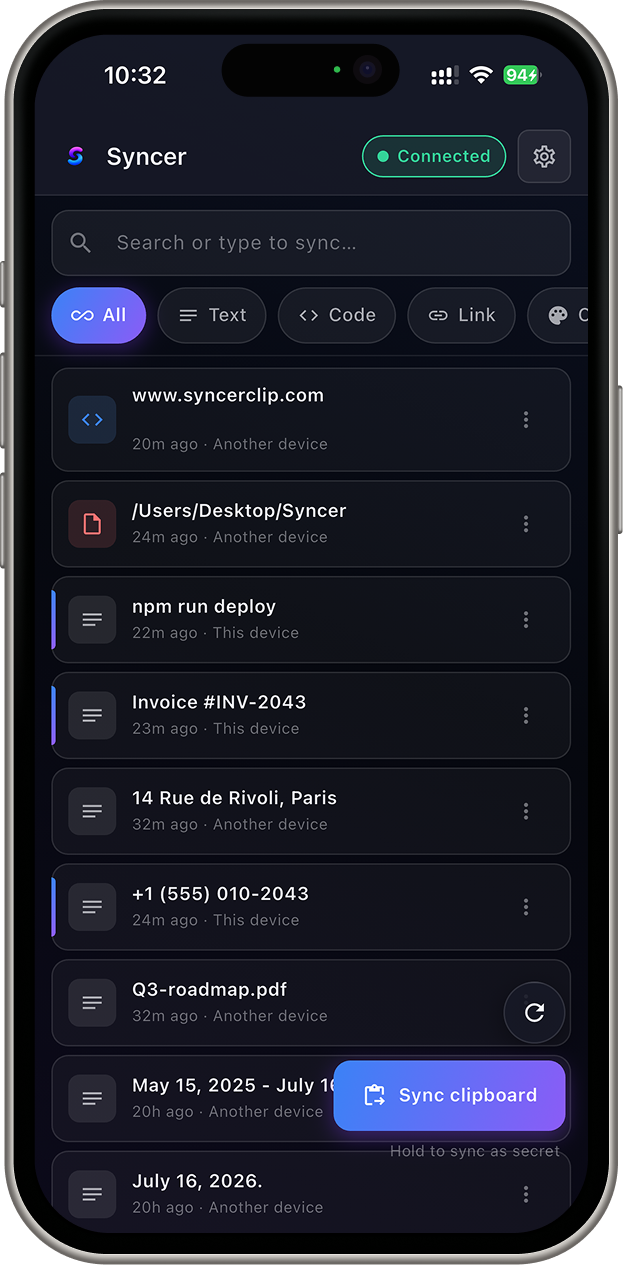
Clipboard history

Find anything you've ever copied.

Every clip is saved, searchable, and synced. That API key from this morning, the invoice number from Tuesday, the address from last week — search, find, paste. It's all on-device and encrypted, and it expires on your schedule.

  • 3 min ago sk_live_9f2a…
  • Tuesday Invoice #INV-2043 Found
  • Last week 14 Rue de Rivoli, Paris

Free keeps 7 days. Pro remembers everything.

Syncer clipboard history: searchable list of copied items with type filters and a detail panel

Why not just use the built-in one?

Because the built-in ones are locked to a single ecosystem. Syncer isn't.

Works where Apple won't

Universal Clipboard is great — right up until you touch a Windows PC or an Android phone. Syncer moves text any direction: Mac↔Android, Windows↔iPhone, whatever mix you run.

Android ↔ Windows ↔ Linux ↔ Apple

Leaves your passwords alone

Copy a password or a secret and Syncer simply doesn't sync it. Anything your OS or password manager marks sensitive stays on the device you copied it on.

Smart clipboard protection

Encrypted, so we can't read it

Every clip is encrypted on your device before it leaves — the same protocol behind Signal and WhatsApp. Our servers relay sealed data they have no key to open.

End-to-end encrypted

Syncer vs. the clipboard tools you've tried

Most are single-device, single-OS, or don't leave the desktop. Syncer is none of those.

  Syncer Apple Universal Clipboard Raycast / Paste Ditto / CopyQ
Works on everythingApple onlyMac / WinDesktop only
Desktop ↔ desktop, any OSApple ↔ Applesame app only
Desktop ↔ phoneApple ↔ Apple
Paste from phone keyboard
End-to-end encryptedin transit onlylocal onlylocal only
Skips passwords & secrets
History, search & backuphistory only
Security

Everything is encrypted
before it leaves your device.

We relay encrypted data. We never see what's inside. It's the same end-to-end encryption behind Signal and WhatsApp — only your own devices hold the keys.

  • Encrypted on-device, alwaysClips are sealed before they're sent. Our servers only ever handle ciphertext.
  • No tracking, no ads, no resaleWe don't log what you copy or build a profile. There's nothing to sell.
  • Verify devices, revoke instantlyConfirm any device by fingerprint or Face ID, and cut its access with one tap.
End-to-end encryption: encrypted on your laptop, relayed sealed, decrypted only on your phone

Free to sync. Pay for superpowers.

You'll never pay to copy and paste. Pro is for the people who live in their clipboard.

🎉 Early-access members get founder pricing — 50% off Pro for life

Free

For people who occasionally move things between devices.
$0
Yours forever
Start free
  • Copy on any device, paste on any other
  • The mobile paste keyboard
  • 7 days of searchable history
  • End-to-end encryption

Lifetime

For people who are done paying monthly for anything.
$149 once
Buy it once, use it for years
Reserve lifetime
  • Every Pro feature, forever
  • All future updates included
  • No subscription. No rug pull.
  • Pays for itself in a couple of years

Running a team? There's a plan for shared, secure snippets too — just ask. Pricing is provisional while we finish the beta; early-access members lock in founder rates and aren't charged until launch.

Be first to sync everything.

Drop your email for early access and founder pricing — and tell me what to build. One field, no onboarding funnel.

Something broke — try again, or just email [email protected].
No spam. One email when it's ready. Unsubscribe any time.

You're in 🎉

Thanks — I'll email you the moment Syncer's ready, and your founder pricing is locked in.

S

Why I built this

I kept emailing myself links. Typing 2FA codes by hand off my laptop screen. Losing that one command somewhere between my Mac and a server. Every clipboard tool I tried either stopped at the desktop or stopped at Apple's front door.

It annoyed me enough that I finally built the fix — one clipboard that follows me across every device, and doesn't read my data on the way. If that sounds like your day too, you'll get it.

— the founder

The questions you're actually asking

Can my employer — or you — read my clipboard?
No. Clips are encrypted on your device before they're sent, so nobody on the network path — us, your ISP, your employer's network, anyone sniffing the wire — can read them. Only your own paired devices hold the keys.
Does it actually work between iPhone and Windows (or Android and Mac)?
Yes — that's the entire point. iPhone ↔ Windows, Android ↔ Mac, Linux ↔ iPhone, any combination. Unlike Apple's clipboard, Syncer doesn't care which ecosystems your devices come from.
How fast is it?
Real-time. It rides a live connection rather than a slow poll, so in practice the clip is waiting on your other device before you've finished switching to it.
What happens to passwords and 2FA codes?
Passwords and anything your OS or password manager marks sensitive are never synced at all — they stay on the device you copied them on. One-time codes can be set to auto-expire after you paste them, so they don't linger in your history.
Will it drain my battery?
Negligible. Syncer only does work when your clipboard actually changes, and the keyboard uses a pre-warmed lightweight engine instead of booting the whole app.
Do I need an account?
Yes — a lightweight one (a one-time email code, Google, or Apple) so your devices can find each other. No password to remember, and it never gives us the ability to read your clipboard.

Your clipboard is about to work everywhere.

Get early access — free